
How to Create a Quiz That Actually Converts to Sales: Step-by-Step Guide
Learn how to build a quiz funnel that actually sells. 3 proven tips + ready-to-use question examples for your business. Create your quiz on Linkks.cc in 10 minutes.
How to Build a Quiz That Actually Sells (Not Just Collects Emails)
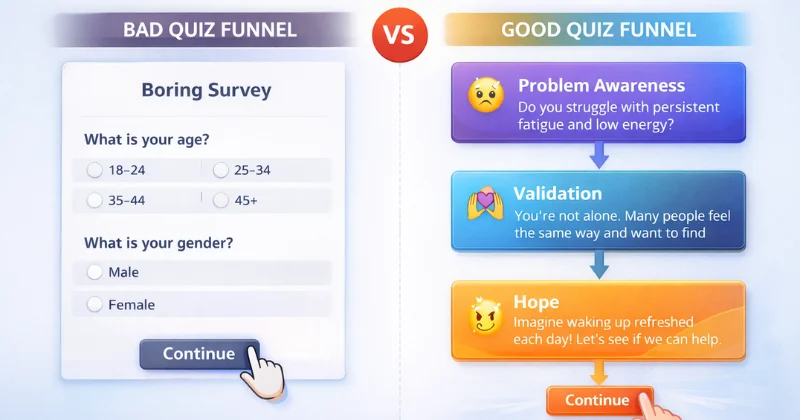
Have you ever taken an online quiz that just asks you 10 questions about your age, gender, and location, then says "thanks, we'll be in touch"? And after that, you never bought anything, right?
That's exactly the problem with most quizzes. They collect data, but they don't sell. They ask questions, but they don't create an emotional connection. And as a result, the conversion to purchase is terrible.
A good quiz is not a survey. It's a mini-funnel that takes someone from "I have some kind of problem" to "I'm ready to buy the solution right now." And if you build your quiz correctly, it can lift conversion by 10-20% without any changes to the actual product.
The Problem: Why Most Quizzes Don't Sell
Let's be honest. You put time and money into creating a quiz. You set up ads to drive people to it. And what happens? People take the quiz, leave their email, and... crickets. Nobody buys.
Why does this happen?
Because most quizzes are built wrong. They focus on collecting information (name, phone, date of birth, your favorite color), but completely forget about the user's emotional journey.
Imagine you walk into a clothing store. A salesperson approaches you and says: "What's your name? What's your size? What's your budget?" And that's it. Not a word about what suits you, what solves your problem, why it's worth buying. You'd just turn around and leave.
A quiz works exactly the same way. If it only collects data and doesn't guide the user through problem awareness, validation, and hope for a solution, it doesn't sell. It just takes up space on your page.
The Solution: Three Rules for a Quiz That Converts
If you want your quiz to actually sell and not just collect email addresses, here's what you need to do.
Rule 1. Talk to Users About Their Problems
First and most important: your quiz should talk about the user's pain, not about your product.
Most quizzes do this:
"What's your age?"
"What's your gender?"
"Where do you live?"
And people go through this mechanically, without any emotions. But here's how you should do it:
"Do you feel short of breath when climbing to the third floor?"
"Do you often feel embarrassed by your reflection in the mirror?"
"Do you get skin breakouts after stress?"
See the difference? The first option collects data. The second option highlights a problem that the person might not even have been aware of.
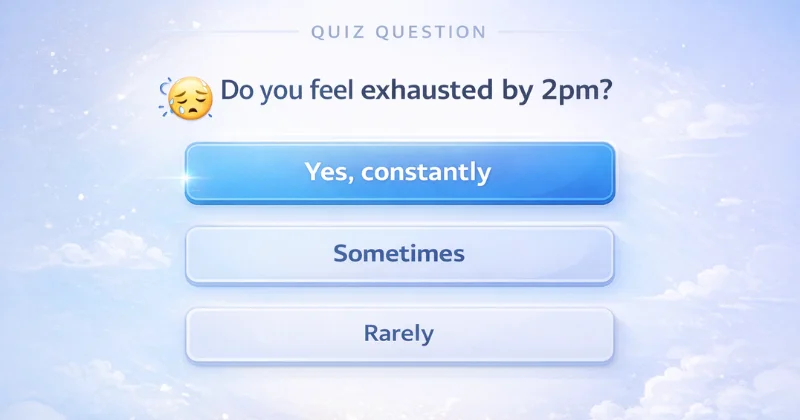
If you're selling a healthy eating course, don't ask "how old are you." Ask "do you feel tired after lunch?", "is it hard to focus at work after 3pm?". The person starts thinking: "Yeah, damn, I actually do have this. Maybe I really do need to change something."
Rule 2. Give Feedback Every 5 Questions
This is where most quizzes fail. They ask 15 questions in a row, then say "thanks, we'll send you the results." And the person leaves the quiz feeling like "I just wasted 3 minutes and got nothing."
A good quiz gives feedback along the way. About every 5 questions, you add a screen that says something like:
"You know, 57% of people with your eating pattern face the same problem. You're not alone."
"This is completely normal. Here's why this happens: your body is used to a certain routine, and this can be changed."
What does this do? It moves the person from a state of "something's wrong with me" to "turns out I'm not alone, and there's an explanation for this." This is validation. And it's critically important for conversion.
Because when a person feels understood, that their problem is real and normal, they're much more ready to trust your solution.
Rule 3. Lead from Problem to Hope
If the first part of the quiz is focused on the problem (awareness), the second part should sell the solution (hope).
Here's how this looks in practice. The first 5-7 questions talk about pain:
"Is it hard for you to fall asleep at night?"
"Do you wake up tired even after 8 hours of sleep?"
"Do you feel stressed throughout the day?"
And the next 5-7 questions lead to the solution:
"What breakfast gives you energy?"
"Have you ever tried tracking your water intake?"
"How often do you take breaks to recover during the day?"
And between these questions, you insert success stories:
"95% of our users who started following a simple plan saw their first results within 2 weeks."
"Here's Maria from Austin. She started with the same problems as you. And after a month, her energy level increased by 40%."
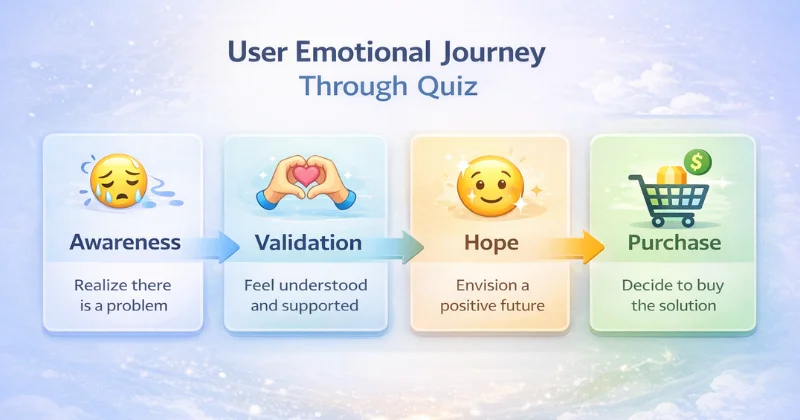
See the logic? You're leading the person from "I have a problem" through "this is normal, and I'm not alone" to "there's a specific path, and it works."
By the time the person reaches the payment screen, they've already emotionally "bought" the result. All that's left is to click the button.
How to Use This in Practice Right Now
If you already have a quiz, here's what to do:
1. Rewrite the first 5 questions. Make them only about symptoms and discomfort. Not about age, not about location, but about pain. "Do you feel...?", "Does it bother you...?", "Have you experienced...?".
2. Add at least one intermediate screen with a fact and reassurance. After question 5, put a screen that says: "You know, [statistic]. This is completely normal, and here's why [brief explanation]."
3. Split the quiz into two meaningful parts. First part: "What's the problem". Second part: "How we'll solve it". And between them, add a success story or case study.
How Linkks.cc Helps You Create This Quiz in 10 Minutes
Most people think creating a good quiz requires a programmer, designer, and tons of time. It doesn't.
On linkks.cc you can create a full quiz in 10 minutes, without any code. And here's why it's convenient for your business:
Simple forms and quizzes. You just add questions, set up the logic (which question follows which), and that's it. Linkks takes care of the design to make it look professional.
Collect requests right on the page. When someone completes the quiz, they can leave their contact or even immediately book a consultation. Everything in one place, no transitions to other sites.
Integration with your social media. Your quiz lives on your linkks page, which already collects all your links: Instagram, Telegram, YouTube, courses, products. Someone takes the quiz and immediately sees your entire ecosystem.
Analytics. You see how many people started the quiz, how many finished it, which question had the biggest drop-off. This gives you the ability to improve the quiz over time.
And the best part: you don't need to change the link in your bio every time you launch a new quiz. Just add it to your linkks page, and you're done.
Who This Is Especially Useful For
Linkks quizzes are perfect for:
Psychologists, coaches, consultants. A quiz helps clients become aware of the problem and book a session.
Beauty specialists, cosmetologists. A quiz for selecting procedures or care programs.
Online courses and schools. A quiz to determine knowledge level or course selection.
Services that rely on requests. A quiz instead of a regular "leave your contact" form gives much higher conversion.
Get Started in 7 Minutes
Here's what to do right now:
1. Go to linkks.cc and click "Create" 2. Select the option "Add quiz or form" 3. Write 5-7 questions about your client's problem 4. Add an intermediate screen with validation ("this is normal, here's why...") 5. Add 3-5 questions about the solution 6. Insert a success story or case study 7. Set up the contact collection form at the end
Done. Now you have a quiz that doesn't just collect emails, but sells.
And if you have questions, support is available through @LinkksSupportBot on Telegram. Quick, no email queues, just message.
The Bottom Line
A quiz is not a survey. It's a sales tool that guides people through three key emotions: problem awareness, validation ("I'm not alone"), and hope for a solution.
If you build your quiz correctly, it can lift your conversion to purchase by 10-20%. And you don't need a programmer or designer to do it.
Linkks.cc gives you everything you need: simple forms, quizzes, request collection, analytics. All in one place. In 7 minutes.
Ready to create your first quiz?